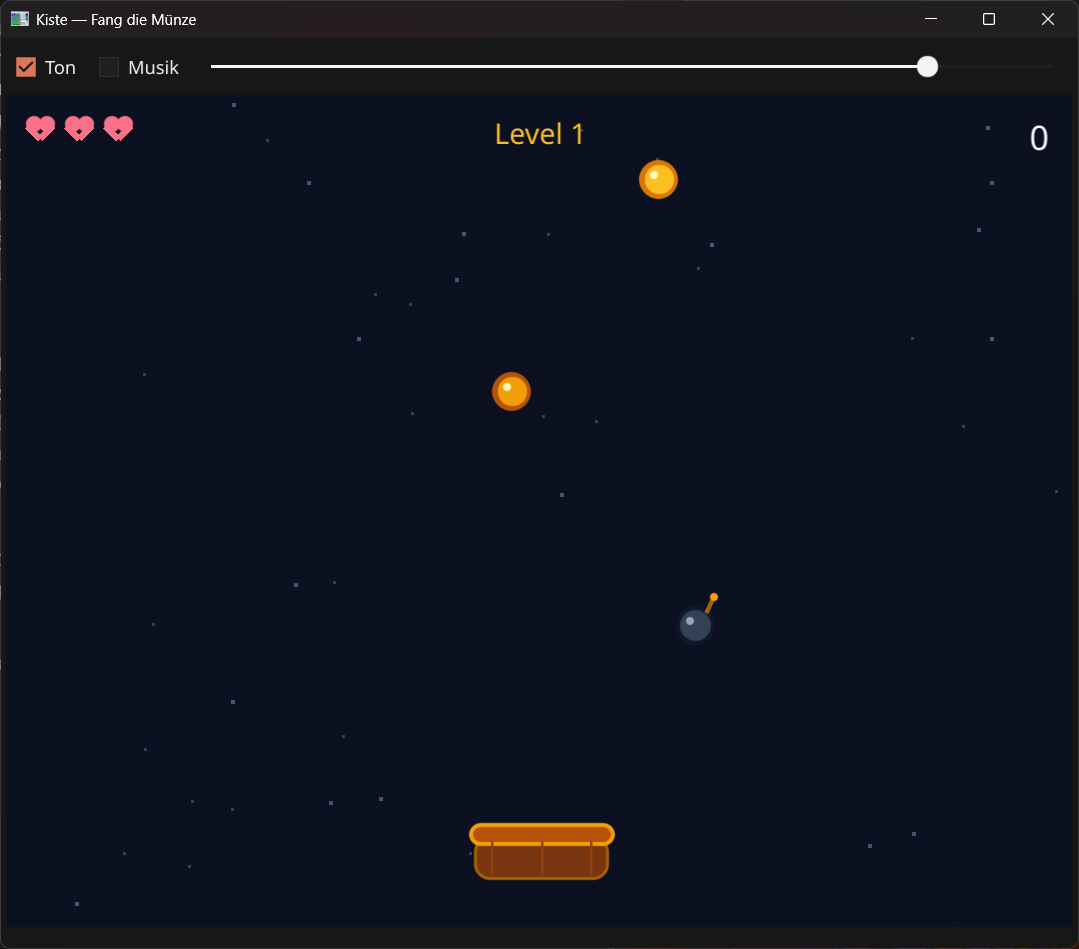
How it's built
Catch the Coin is pure Kiste. It uses only the built-in modules gui
(windows, drawing, mouse, keys), klang, liste,
zufall, datei, text and wert — no
external game engine. Here are the most interesting parts.
1 · Everything falls in parallel lists
Instead of objects, the game keeps one list per property — item i has its
position in ix[i]/iy[i], its type in it[i]. Seven
types, from the bronze coin to the clock.
// Everything that falls lives in parallel lists — item i has its
// position in ix[i]/iy[i], its type in it[i].
// Type: 0 bronze · 1 gold · 2 diamond · 3 bomb · 4 heart · 5 star · 6 clock.
nimm ix = liste.gefüllt(0, 0)
nimm iy = liste.gefüllt(0, 0)
nimm it = liste.gefüllt(0, 0)
nimm ivy = liste.gefüllt(0, 0)
nimm ialive = liste.gefüllt(0, 0)
2 · Faster and more dangerous
The endless feel comes from two dials: the level raises the bomb probability, and things fall faster. The type is drawn by weighted random — coins often, diamonds and power-ups rarely.
// Higher levels bring more bombs — and everything falls faster.
nimm bomb_ch = 12 + level * 2
wenn bomb_ch > 32 { bomb_ch = 32 }
wenn r < bomb_ch { t = 3 }              // bomb
sonstwenn r < bomb_ch + 3 { t = 4 }     // heart (rare)
sonstwenn r < bomb_ch + 6 { t = 5 }     // star (2x points)
sonstwenn r < bomb_ch + 9 { t = 6 }     // clock (slow motion)
sonstwenn r < bomb_ch + 15 { t = 2 }    // diamond
sonstwenn r < bomb_ch + 45 { t = 1 }    // gold
sonst { t = 0 }                         // bronze
3 · Catch or miss
The whole mechanic sits in one check: is an item at basket height and close enough to the basket's centre? Then it's caught. If it falls off the bottom it's missed — and a missed gold or diamond coin breaks the catch streak.
// Caught when an item reaches the basket in height AND width.
wenn y >= KORB_Y - 8 und y <= KORB_Y + 30 und betrag(x - px) < KORB_B div 2 + 16 {
    ialive[i] = 0
    fang_item(t, x, KORB_Y)
} sonstwenn y > HOEHE + 20 {
    ialive[i] = 0
    wenn t == 1 oder t == 2 { combo = 0 }   // missed a valuable coin
}
4 · Combo, points and power-ups
What happens on a catch depends on the type. A bomb costs a life (and the screen flashes red). Otherwise the combo grows — one more multiplier every five catches — and star or clock unlock double points or slow motion for a few seconds.
funktion fang_item(t, x, y) {
    wenn t == 3 {
        leben = leben - 1                    // a bomb costs a life
        combo = 0
        flash = 12
        wenn leben <= 0 { game_over() }
    } sonst {
        combo = combo + 1
        wenn t == 5 { doppel = 500 }          // star: 2x points
        sonstwenn t == 6 { slow = 360 }       // clock: slow motion
        sonst {
            nimm mult = 1 + combo div 5       // a catch streak pays off
            wenn doppel > 0 { mult = mult * 2 }
            punkte = punkte + item_wert(t) * mult
        }
    }
}
5 · Sprites from circles and lines
There are no image files — every coin, diamond and bomb is assembled per frame from
gui.kreis and gui.linie. A bright dot turns a circle into a
shiny coin, a short line with a spark into a bomb.
// Not a single image — every item is built from circles and lines.
// A coin with a shine dot:
gui.kreis(bild, x, y, 15, "#b45309")
gui.kreis(bild, x, y, 11, "#f59e0b")
gui.kreis(bild, x - 4, y - 4, 3, "#fef9c3")
// A bomb with a fuse and a spark:
gui.kreis(bild, x, y, 15, "#0f172a")
gui.linie(bild, x + 8, y - 10, x + 13, y - 20, "#a16207", 3)
gui.kreis(bild, x + 14, y - 22, 3, "#f59e0b")
6 · Mouse and keyboard
You'll steer the basket most naturally with the mouse — gui.bei_maus_bewegung
sets its position directly. Prefer keys? The arrows work too; both run at the same time.
// The basket follows the mouse …
gui.bei_maus_bewegung(bild, funktion(c) {
    wenn modus == 1 { px = gui.maus_x(c) }
})

// … or the arrow keys (in the game loop, held keys):
wenn gui.taste_gedrückt(fenster, "links") == 1 { px = px - SP_SPEED }
wenn gui.taste_gedrückt(fenster, "rechts") == 1 { px = px + SP_SPEED }
That's the whole recipe: a few parallel lists, a collision check, a timer and hand-drawn sprites. The full source is included in the download above — invent new item types, tune the difficulty, build your own catch game from it.