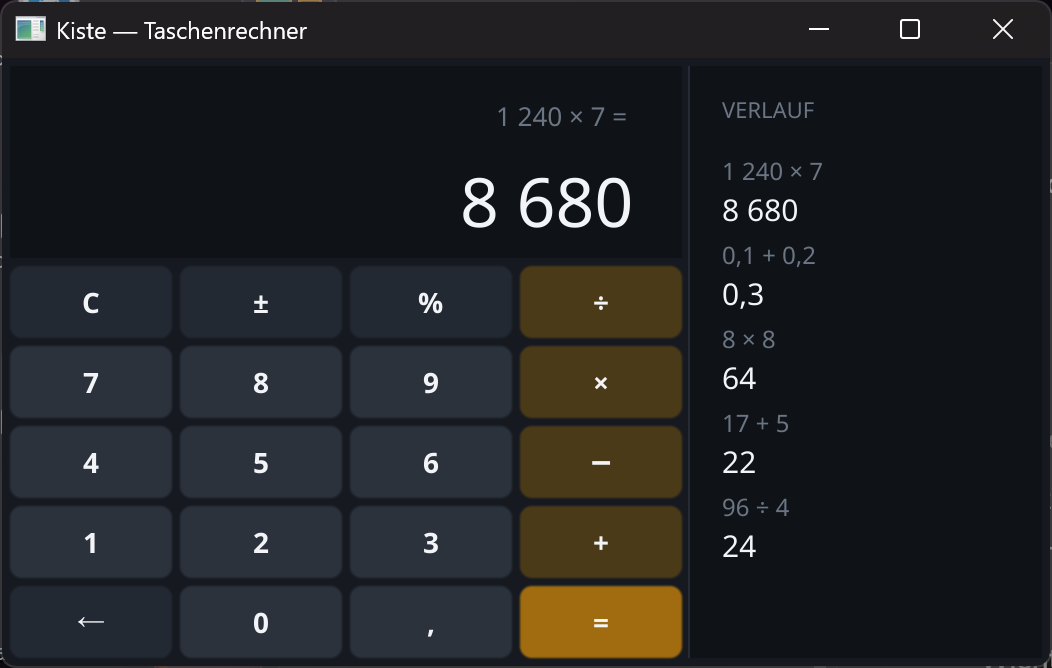
How it's built
A calculator sounds like a finger exercise, but it's a good lesson: a little state, a grid full of buttons, a hand-drawn display — and one decision about numbers that many languages get wrong.
1 · Why 0.1 + 0.2 really is 0.3 here
In most programming languages 0.1 + 0.2 is not 0.3 but
0.30000000000000004. That's floating point: it calculates in binary and cannot represent
tenths exactly. Kiste has its own number type for this — dezimal works in
exact decimal places, which is what you want for money and for calculators.
// Gerechnet wird mit "dezimal" — exakt, nicht mit Gleitkomma.
nimm gespeichert = 0.0            // eine Dezimalzahl

funktion anwenden() {
    nimm jetzt = als_dezimal(anzeige)
    wenn operator == "+" {
        gespeichert = gespeichert + jetzt
    }
}
2 · Dividing by zero, without a crash
Kiste raises an error on division by zero — rightly so, since silently returning „infinity" only hides programming mistakes. A calculator must not crash over it, though. So we ask beforehand.
// Teilen durch null wird abgefangen, bevor es passiert —
// das Programm zeigt "Nicht definiert" statt abzustuerzen.
wenn operator == "÷" {
    wenn jetzt == 0 {
        fehler = wahr
    } sonst {
        gespeichert = gespeichert / jetzt
    }
}
3 · A key is three lines
Every key is a real button with its own colour. Since that repeats twenty times, it goes into a small function that hands back the finished button.
// Eine Taste bauen: Knopf anlegen, einfaerben, fertig.
funktion taste(beschriftung, farbe) {
    nimm k = gui.knopf_neu(beschriftung)
    gui.setze_knopf_farbe(k, farbe)
    gib k
}

nimm k7 = taste("7", ZIFFER)
gui.bei_klick(k7, funktion(k) { tippe("7") })
4 · The grid arranges itself
No calculating of positions: gui.raster gets the number of columns and the
keys in reading order — it does the rest by itself, including when the window grows.
// Zwanzig Tasten, vier Spalten — das Raster ordnet sie selbst.
nimm gitter = gui.raster(4, [
    k_c,     k_vz, k_proz,  k_div,
    k7,      k8,   k9,      k_mal,
    k4,      k5,   k6,      k_minus,
    k1,      k2,   k3,      k_plus,
    k_rueck, k0,   k_komma, k_gleich
])
5 · The display is drawn, not set
A normal text field can't give you the large number with the small line above it. So the display is a canvas the program paints on itself — background, secondary line, result. It becomes right-aligned by subtracting the text width from the right edge.
// Die Anzeige ist eine kleine Zeichenflaeche. Rechtsbuendig heisst:
// die geschaetzte Textbreite vom rechten Rand abziehen.
funktion zeichne_anzeige() {
    gui.leeren(feld)
    gui.rechteck(feld, 0, 0, A_BREITE, A_HOEHE, FELD)

    nimm gross = hübsch(anzeige)
    nimm breite = länge(gross) * 19
    gui.text_an(feld, A_BREITE - 16 - breite, 44, gross, HELL, 34)
}
6 · Grouping thousands
„8680" reads badly, „8 680" reads well. The rule is simple: a space after every third digit from the right — so walk through character by character and count how many still follow.
// "1240" → "1 240": nach jeder dritten Stelle von rechts
// kommt ein schmales Leerzeichen.
funktion gruppiert(t) {
    nimm aus = ""
    nimm n = länge(t)
    nimm i = 0
    solange i < n {
        aus = aus + text.zeichen_bei(t, i)
        nimm rest = n - i - 1
        wenn rest > 0 und rest % 3 == 0 {
            aus = aus + " "
        }
        i = i + 1
    }
    gib aus
}
7 · Mouse and keyboard, the same code
The keyboard calls exactly the same functions as the buttons. That way the operating
logic exists only once — tippe, gleich,
alles_löschen — and the two paths cannot drift apart.
// Maus UND Tastatur: derselbe Code, egal ob geklickt oder getippt.
gui.bei_taste(fenster, funktion(f) {
    nimm t = gui.letzte_taste(f)
    wenn text.enthält("0123456789", t) {
        tippe(t)
    }
    wenn t == "=" oder t == "eingabe" {
        gleich()
    }
    wenn t == "escape" {
        alles_löschen()
    }
})
That's the whole calculator: one file, no extra assets, no framework. Rebuild it, add a square-root key, or make it remember the last value — the source is up there to take with you.